How do I record a voice room?
In a voice room, click the red dot to record. Click the square to stop. The talk then shows in Meetings with its recording, transcript and AI notes.
In a Team chat voice room, click the red dot to start recording. Click the square to stop. The talk then shows in Meetings, with its recording, transcript and AI notes, like any other meeting.
Also called: record a call, record a voice channel, record the team, Discord recording, meeting notes from a voice room, enregistrer un salon vocal, enregistrer l'appel
Step 1: Start recording
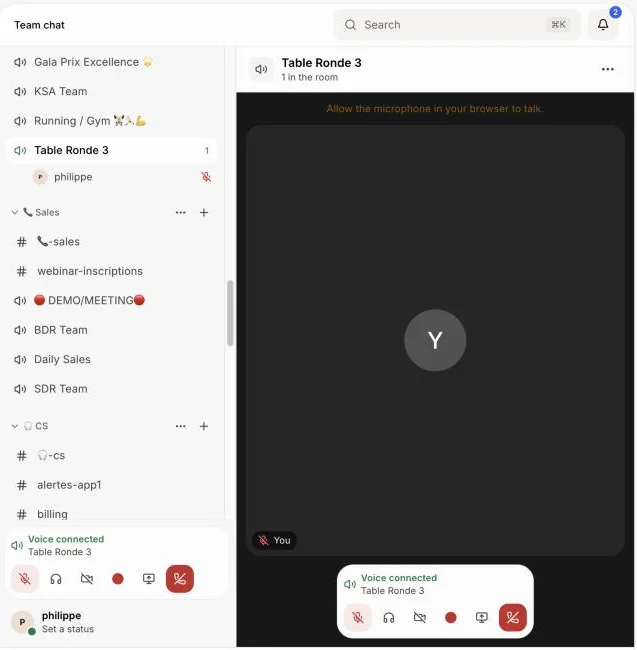
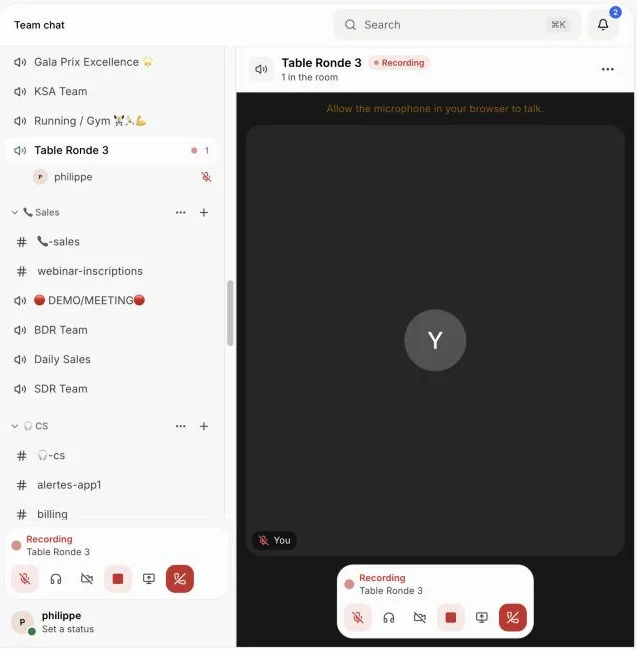
Join a voice room in Team chat. In the bar with your microphone and camera, click the red dot. Everyone in the room sees Recording in red, and a red dot shows beside the room in the sidebar.
Click: Team chat › your voice room › red dot
Step 2: Stop recording
Click the square in the same bar. You all stay in the room and keep talking: only the recording stops. A few minutes later, the meeting shows in Meetings with the recording, the transcript and the AI notes.
If you forget, it stops on its own 5 minutes after everyone has left the room.
Click: square (Stop recording)
Good to know
Anyone in the room can start or stop the recording.
The meeting is named after the room. Whoever clicked Record holds it, and everyone who was in the room while it recorded sees it in My meetings.
When the recording starts or stops, the call reconnects for a second. If you were sharing your screen, share it again.
A recording needs at least two people in the room. Alone, nothing is kept.
You can also ask Alori: "record the Lounge" or "stop recording the Lounge".
If it doesn't work
"Join the room first to record it." Someone has to be in the room.
"Add Meetings to your app to record voice rooms." Your app has no Meetings page yet. Ask Alori to add it.
"Out of credits" Add credits in Alori: recording and AI notes use them, like any recorded meeting.