How do I see my next meeting at the top of the screen?
Your next meeting shows in the top bar of every page, with how long until it starts. It turns amber 15 minutes before, green when it's about to start, and red only if you're late.
Your next meeting shows in the top bar, above every page: how long until it starts, in big letters, then its name in small. It turns amber 15 minutes before and green in the last 5 minutes and while it's on. It turns red only if you're late, and flashes when it starts in 5 minutes or less and for the first 10 minutes once it has started.
Also called: upcoming meeting, next appointment, meeting reminder, late for a meeting, prochaine réunion, prochain rendez-vous, rappel de réunion
Step 1: Look at the top bar
The meeting comes from your Google or Outlook calendars and the Alori events you made or were invited to. It shows In 12 min, a time like 2:00 p.m., Tomorrow 9:00 a.m., Started 3 min ago or Now. Click it: a meeting with a video link opens the call (Join), any other opens that day on the Schedule.
All-day events, events you declined, time marked free and calendars you hid on the Schedule are left out. Nothing shows when no meeting starts in the next two days.

Step 2: Turn it off or on
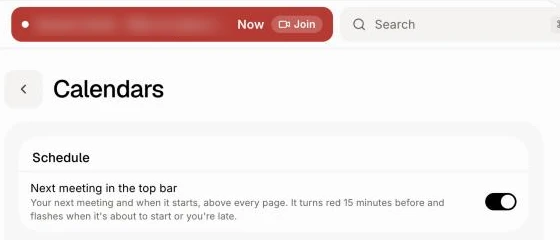
It's on for everyone. Each person turns it off for themselves: on the Schedule, click ⋯ › Schedule settings, then switch off Next meeting in the top bar. You can also ask Alori: "hide my next meeting at the top".
Click: Schedule › ⋯ › Schedule settings › Next meeting in the top bar
If it doesn't work
No meeting shows. Connect your calendar first, and check the meeting's calendar is ticked on the Schedule. Only meetings in the next two days show.
The wrong meeting shows. A meeting already going on comes before the next one. Decline the one you skip, or hide its calendar on the Schedule.