How are my employees' identity papers kept private?
Only owners see identity papers, Alori notes who opens each one and when, and when someone leaves you can delete theirs in one click.
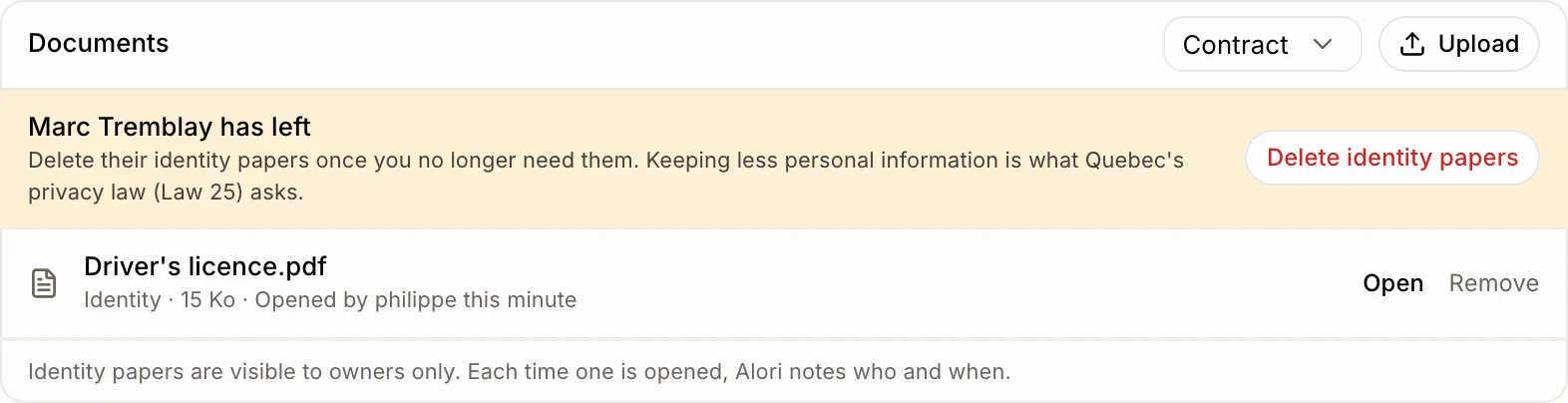
Identity papers (a driver's licence, a work permit, a social insurance card) are visible to owners only. Each time one is opened, Alori notes who opened it and when. When someone leaves, their file offers to delete their identity papers in one click.
Also called: privacy, personal information, Law 25, Loi 25, ID, SIN, NAS, pièces d'identité, renseignements personnels, confidentialité
Step 1: Add an identity paper
Open the person under Employees. In Documents, pick Identity in the menu, then click Upload and choose the file. Only owners can add or see this kind.
Click: Employees › the person › Documents › Identity › Upload
Step 2: See who opened it
Under each identity paper, Alori shows "Opened by" the last person who opened it, and when.
Step 3: Delete them when the person leaves
Once someone has left, their Documents shows "{name} has left". Click Delete identity papers and confirm. This deletes every identity paper on their file for good. Contracts and training papers stay.
Click: the person › Documents › Delete identity papers
Good to know
Quebec's privacy law (Law 25) asks businesses to keep personal information only as long as they need it. Alori reminds you; when to delete is your call.
Supervisors and office staff who can see employees never see identity papers.
Accepted files: PDF, photos and Word documents, 15 MB at most.
If it doesn't work
You don't see Identity in the menu. Only owners can add identity papers.
You don't see Delete identity papers. The person is still active, or has no identity papers on file.