How do my technicians add expenses?
On the job, tap Add an expense, type the amount, pick what for and snap the receipt. You approve it under Employees › Hours; it counts in the job cost.
On the job, the technician taps Add an expense, types the amount, picks what it was for and snaps the receipt. You approve it under Employees › Hours, in Expenses to repay. Approved expenses count in the job's Job cost.
Also called: expense report, receipt, reimbursement, parts bought, fuel, dépenses, reçu, remboursement, note de frais
Step 1: Add it from the job
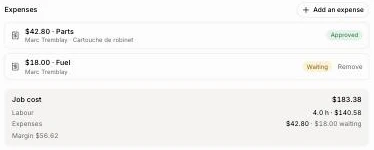
Open the job and tap Add an expense. Type the Amount, pick Parts, Fuel, Meal, Tools or Other, tap Take a photo for the receipt, then Add the expense. It shows on the job as Waiting.
Step 2: Approve it
Go to Employees › Hours. Expenses to repay lists what waits, with the receipt. Click Approve or Decline.
Good to know
Job cost shows the owner the labour, the approved expenses (and what's waiting) and the Margin left from the job's price.
A person's file shows their Last 90 days: jobs done, hours, how often they started on time, and return visits within 30 days.
On a phone, technicians see Put the app on your phone to add it to their home screen.
You can ask Ask Alori: "Which expenses are waiting?" or "How are my techs doing?"
If it doesn't work
"You need an employee file to add expenses." Add the person under Employees with the email they sign in with.
"Use a photo or a PDF." The receipt must be a photo or a PDF.