How do I answer a calendar invitation?
Open the invitation on your Email page and click Yes, No or Maybe. The organizer is told, and your calendar is updated.
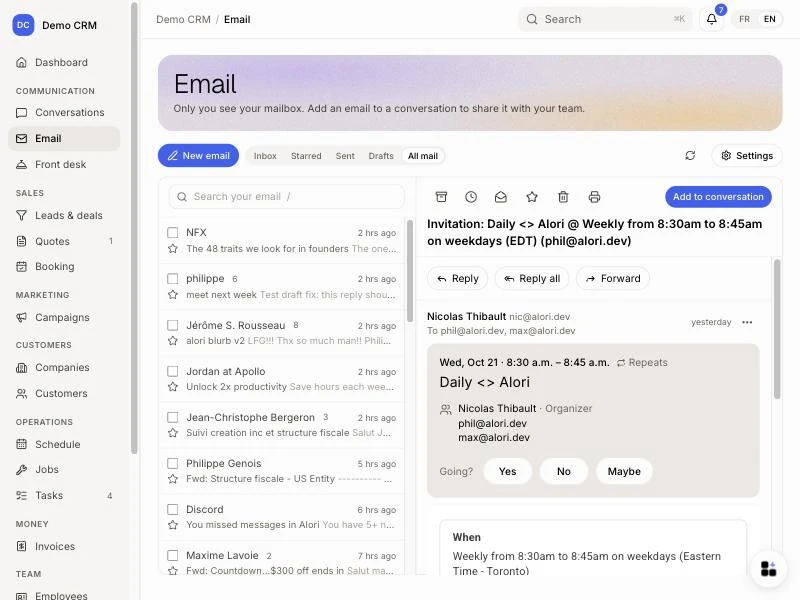
When someone invites you to a meeting (from Google Calendar, Outlook or Teams), the email shows a card on your Email page, like in Gmail: when, what, who is invited, and what is on your calendar then. Click Yes, No or Maybe to answer.
Also called: RSVP, accept a meeting, decline a meeting, meeting invite, calendar invite, Teams invite, Outlook invite, .ics, répondre à une invitation, accepter une réunion, refuser une réunion, invitation Teams
Step 1: Open the invitation
Click Email in the left menu, then click the invitation. The card shows above the email: the day and time, the title, the place, the organizer and the guests. When your calendar is connected, it also says what you have then, like Conflicts with… or Previous event….
Click: Email › the invitation
Step 2: Click Yes, No or Maybe
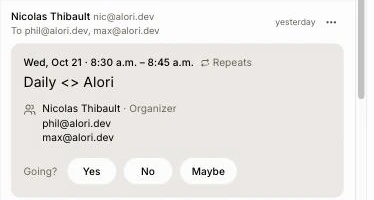
Next to Going?, click Yes, No or Maybe. Your answer is shown with a check mark, and the organizer is told. Changed your mind? Click another answer.
Click: Yes, No or Maybe
Good to know
If the meeting is already on your Google Calendar, your answer is saved there and Google tells the organizer.
If not, Alori emails your answer to the organizer from your Gmail (you see it in Sent). When you say Yes or Maybe, the meeting is added to your calendar.
A video meeting has a Join button. A meeting at an address has Directions.
When a guest answers your own invitation, the email shows one line, like Dana accepted.
A cancelled meeting shows This event was cancelled.
You can ask Ask Alori "say yes to the meeting invite from Dana".
If it doesn't work
No card above the email. The email has no invitation file in it. Answer from the link in the email instead.
No "On your calendar" line. Connect your Google Calendar in Settings, or the meeting is already over.
"Your email didn't load." Try again in a moment.