How do I give a teammate access to my agency?
Invite them from Users with the Admin role. They get your agency's Overview, Clients and Payouts, and can open any client.
Invite your teammate from Users and give them the Admin role. Once they accept, they see the same agency as you: the same clients list, Overview and Payouts, and they can open any client to work in it.
Also called: agency team, share my agency, agency access, staff, partner, équipe de l'agence, partager mon agence, accès à l'agence
Step 1: Invite them as Admin
Open your account menu, then Users. Type their email under Invite by email, pick Admin in the role list, and click Invite. Under the form, Alori says what the role you picked opens. With Admin, it reads that they also get your agency.
Click: your name › Users › Admin › Invite
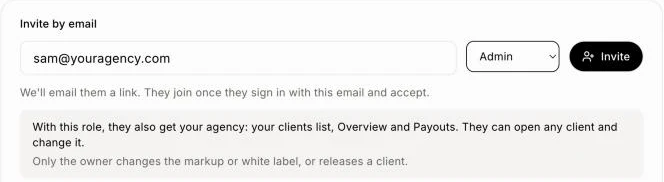
Any role that can build works too. A role that doesn't build, like Office or Technician, only sees your CRM: not your agency and not your clients.
Step 2: They accept and open Agency
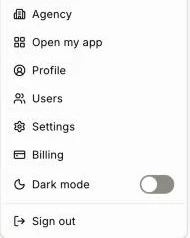
They get an email with a link. They sign in with that same email and accept. Then Agency is first in their account menu.
Click: their name › Agency
Step 3: They work on your clients
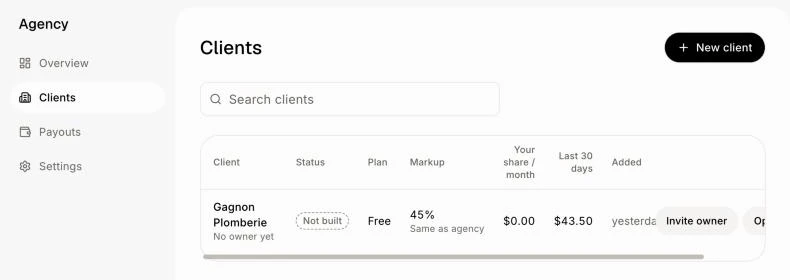
In Clients, they see every client, add a New client, invite a client's owner, and click Open to work inside a client's app.
Click: Agency › Clients › Open
Good to know
Only the owner changes the markup or white label, connects your own domain, or releases a client.
Admin also makes them an admin of your own CRM.
They see all your clients. You can't share only some of them yet.
To take their access away, change their role in Users or remove them.
If it doesn't work
"That person already has their own account with projects or users." Someone belongs to one account only. Invite another email of theirs, for example their work email.
"That email is already invited." Use Resend email next to their name instead.
They don't see Agency. Check their role in Users: it must be Admin, or a role that builds.