How do I set my time zone?
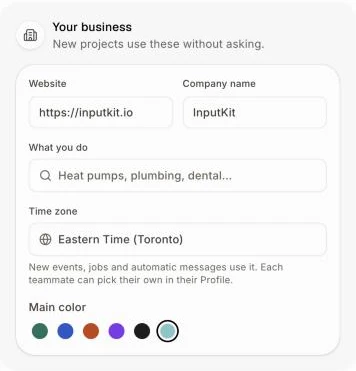
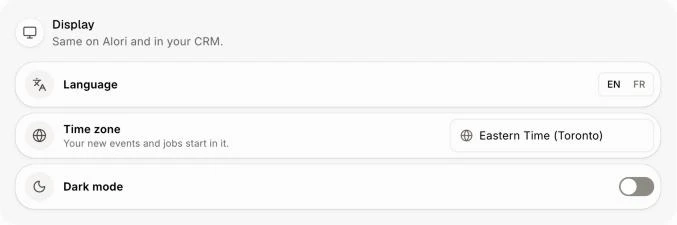
The business's time zone is in Alori's Settings › Your business. Your own is in your Profile › Display. New events and jobs start in yours.
Your business has one time zone, set in Settings › Your business › Time zone. Automatic messages go out in it, and everyone on the team plans in it. If you work somewhere else, pick your own in Profile › Display › Time zone: your new events and jobs then start in yours.
Also called: timezone, time zone, hour, Eastern time, Pacific time, fuseau horaire, heure de l'Est, heure locale
Step 1: Set the business's time zone
Click your name at the top right, then Settings. In Your business, click Time zone and type a city, like "Montréal" or "Vancouver". Click the right one. It saves right away and you see Saved.
Click: your name › Settings › Your business › Time zone
Step 2: Pick your own time zone
Click your name at the top right, then Profile. In Display, click Time zone and pick yours. It starts on the business's. Your new events, jobs and meetings start in it, on every device.
Click: your name › Profile › Display › Time zone
Good to know
Each teammate picks their own. Someone who never picks one follows the business's.
To follow the business's again, pick the business's zone in your Profile.
When you plan an event, More options shows the zone it starts in. You can change it for that one event.
You can also ask Alori: "I'm in Vancouver this week" or "set the business's time zone to Halifax".
If it doesn't work
"We couldn't save the time zone. Try again." The change didn't save. Try again in a moment.
You don't see Time zone in Your business. Your app is still being set up, or it's on an older version. Open Build and ask Alori to update your app to the latest version.
Montréal isn't in the list. Montréal, Québec and Ottawa are on Eastern time: they show up as Eastern Time (Toronto).